
OpenAI Codex
Configure Clinical Terminology MCP servers in OpenAI Codex CLI and Codex Desktop.
Official documentationOpenAI Codex supports MCP servers through two interfaces: the Codex CLI (terminal-based) and Codex Desktop (GUI application). Both support STDIO and Streamable HTTP transports.
Codex CLI
Config File Location
| OS | Path |
|---|---|
| macOS / Linux | ~/.codex/config.toml |
| Windows | %USERPROFILE%\.codex\config.toml |
Basic Setup
Add a single server to ~/.codex/config.toml:
[mcp_servers.snomed]
command = "/usr/local/bin/snomed-mcp"
Complete Configuration
All seven servers:
[mcp_servers.snomed]
command = "/usr/local/bin/snomed-mcp"
env_vars = ["SNOWSTORM_BRANCH"]

[mcp_servers.rxnorm]
command = "/usr/local/bin/rxnorm-mcp"

[mcp_servers.icd10]
command = "/usr/local/bin/icd10-mcp"

[mcp_servers.ucum]
command = "/usr/local/bin/ucum-mcp"

# Servers requiring credentials (set env vars before starting Codex)
[mcp_servers.icd11]
command = "/usr/local/bin/icd11-mcp"
env_vars = ["ICD11_CLIENT_ID", "ICD11_CLIENT_SECRET"]

[mcp_servers.loinc]
command = "/usr/local/bin/loinc-mcp"
env_vars = ["LOINC_USERNAME", "LOINC_PASSWORD"]

[mcp_servers.umls]
command = "/usr/local/bin/umls-mcp"
env_vars = ["UMLS_API_KEY"]
CLI Registration
Instead of editing the config file, you can register servers via CLI:
# Servers without authentication
codex mcp add snomed /usr/local/bin/snomed-mcp
codex mcp add rxnorm /usr/local/bin/rxnorm-mcp
codex mcp add icd10 /usr/local/bin/icd10-mcp
codex mcp add ucum /usr/local/bin/ucum-mcp

# Servers requiring credentials
codex mcp add icd11 --env ICD11_CLIENT_ID=$ICD11_CLIENT_ID --env ICD11_CLIENT_SECRET=$ICD11_CLIENT_SECRET -- /usr/local/bin/icd11-mcp
codex mcp add loinc --env LOINC_USERNAME=$LOINC_USERNAME --env LOINC_PASSWORD=$LOINC_PASSWORD -- /usr/local/bin/loinc-mcp
codex mcp add umls --env UMLS_API_KEY=$UMLS_API_KEY -- /usr/local/bin/umls-mcp
Remote / HTTP Setup (CLI)
Connect to a remote server running in HTTP mode:
[mcp_servers.snomed]
url = "https://your-server.com/snomed/mcp"
bearer_token_env_var = "MCP_API_KEY"
Codex Desktop
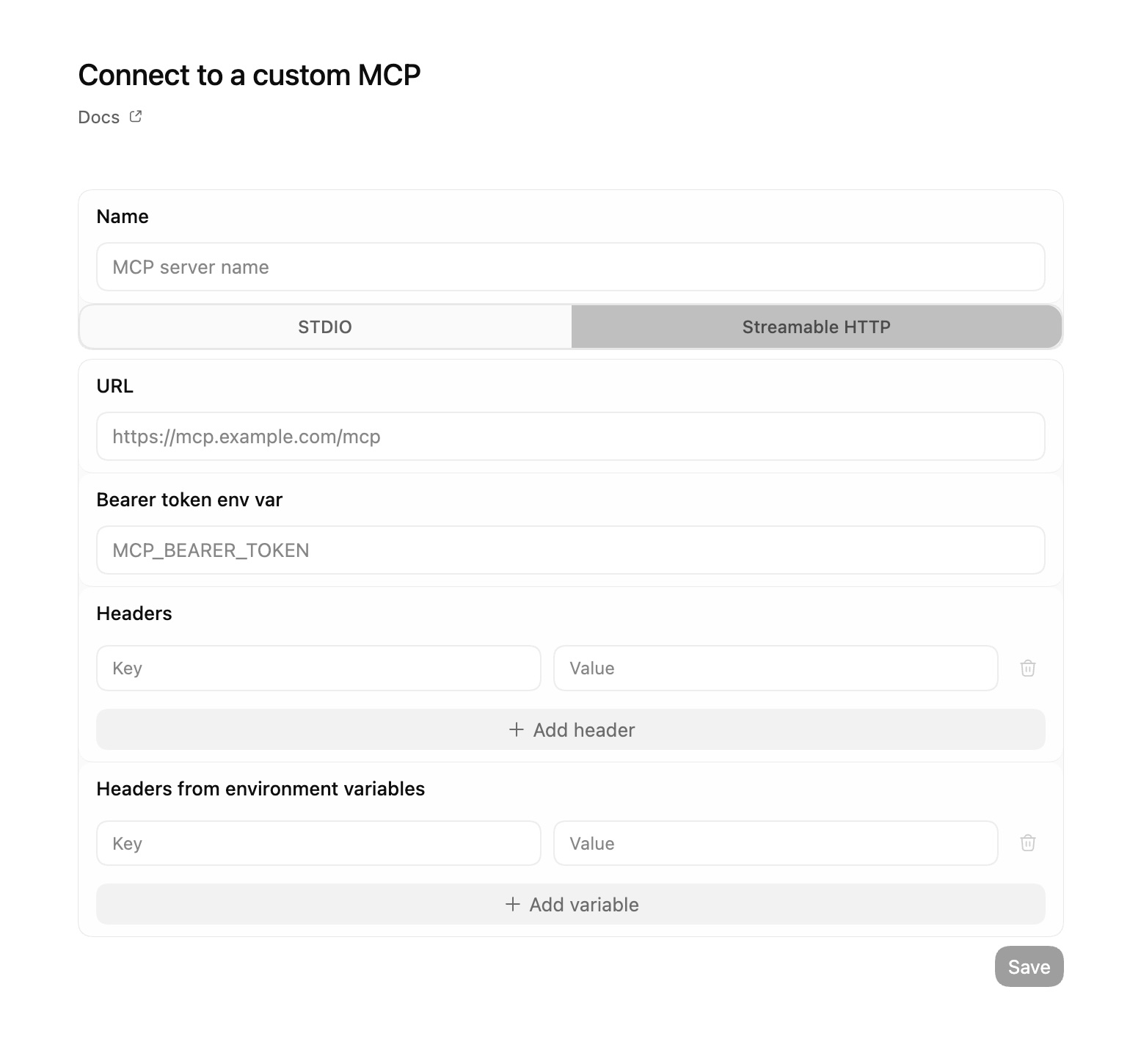
Codex Desktop provides a graphical interface for managing MCP servers. You can configure servers in both STDIO and Streamable HTTP modes through the settings panel.
Adding a Server (STDIO)
In Codex Desktop, navigate to Settings > MCP Servers and add a new server with these fields:
- Server Name:
snomed(or any identifier) - Command:
/usr/local/bin/snomed-mcp - Arguments: (leave empty)
- Environment Variables: Add key-value pairs as needed (e.g.,
SNOWSTORM_BRANCH=MAIN/SNOMEDCT-US) - Working Directory: (optional)
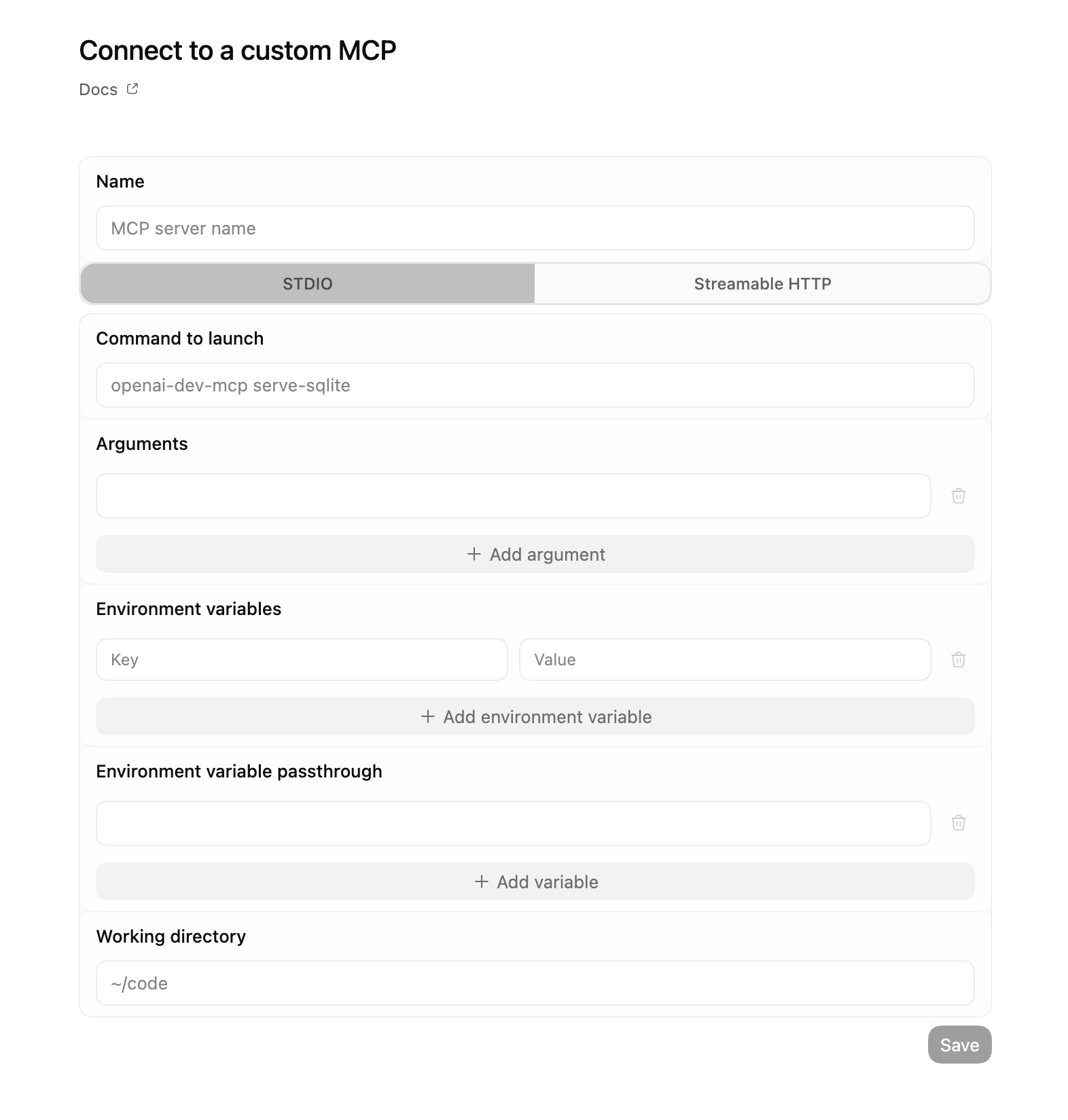
For servers requiring credentials, add the credential environment variables in the Environment Variables section:
| Server | Variables to Add |
|---|---|
| ICD-11 | ICD11_CLIENT_ID, ICD11_CLIENT_SECRET |
| LOINC | LOINC_USERNAME, LOINC_PASSWORD |
| UMLS | UMLS_API_KEY |
Adding a Server (Streamable HTTP)
For remote servers, select the HTTP transport type and configure:
- Server Name:
snomed - URL:
https://your-server.com/snomed/mcp - Bearer Token: (optional, for authenticated endpoints)
- Custom Headers: (optional)
Servers Requiring Credentials
Three servers need credentials configured via environment variables or system keyring:
| Server | Environment Variables |
|---|---|
| ICD-11 | ICD11_CLIENT_ID, ICD11_CLIENT_SECRET |
| LOINC | LOINC_USERNAME, LOINC_PASSWORD |
| UMLS | UMLS_API_KEY |
Start with servers that don’t require authentication (snomed, rxnorm, icd10, ucum) and add authenticated services as needed.
See HTTP Transport for server-side setup and Remote Deployment for deployment guides.